Code
# Find the current working directory (where inputs are found and output are send)
getwd()

# Change the current working directory
setwd("C://your/file/path")Welcome to our first session of Computational Social Sciences!
Today, we will go over the plan for the semester, including:
Looking forward to a great semester with you all!
R is a powerful programming language for statistics, data analysis, and visualization – and best of all, it’s completely free and open-source! This means that new functions and packages are constantly being developed by the community, and the latest statistical methods often become available in R first.
One of R’s biggest strengths is its flexibility. Thanks to its modular package system, you can easily extend its functionality depending on your needs. Whether you’re collecting, processing, exploring, analyzing, or reporting data, R has you covered at every step of the research process.
R also has an amazing and active community, with groups like R-Ladies, R Consortium, and rOpenSci helping to expand and improve it. If you ever need to customize something, you can even write your own functions and share them with others!
Let’s dive in! 🚀
In case you haven`t installed R and RStudio

This is the easiest way, you are of course allowed to use other source code editors (like VSCode, Eclipse, PyCharm, Vim, Emacs or any other preference you might have). I will show the examples in class using RStudio though.
Create a new R Script, R Notebook, or Quarto document:
File.New File.Working directory:
# Find the current working directory (where inputs are found and output are send)
getwd()
# Change the current working directory
setwd("C://your/file/path")When we analyze data in R usually we also depend on functions, other users and developers have written, which are usually stored in so called packages. Packages can be installed and called like this:
install.packages("igraph")

library(igraph)# Get help of a particular function
help(rnorm)
# or
?rnorm
# Search te help files for a word or a phrase (if you don't know the name of the function)
help.search("weighted mean")
# or
??"weighted mean"
# Find help for a package
help(package=igraph)There are three fundamental principles that in my point of view help to understand R.
In R, all data, from simple numbers to complex models, is treated as an object. This means that every piece of data or function can be stored, manipulated, and passed around. An object can represent variables, functions, or even entire datasets.
Whether you are performing basic arithmetic or fitting a stochastic model, every action in R is initiated by a function. This means that every operation can be seen as calling a function that takes input and produces an output. This functional nature of R ensures consistency in how tasks are executed.
# Example:
a <- 5

a

# Function behavior
a <- function(a = 5) {
      a
    }

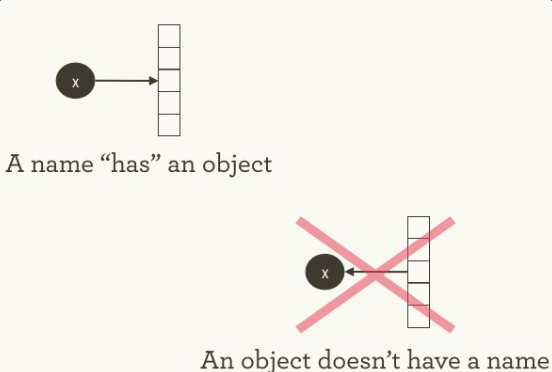
a()In R, you don’t assign values to variables or store 5 in x. Variables in R are not boxes; they don’t contain objects. Instead, you assign (the variable name) x to 5 or bind x to 5. Assignment is simply the association of a name with an object. Any given object may have many names associated with it. At a given instant, a name refers to only one object. Over time, the object a name refers to may vary. (Doane 2018).
Atomic in this case means the data is of size = 1.
| Name | Description | Example |
|---|---|---|
| integer | Whole numbers | 5 |
| numeric | Decimal numbers | 4.2 |
| logic | Boolean values | TRUE, FALSE |
| character | Text or string values | "Hello" |
| NA | Missing value indicator | NA |
| NULL | Missing object indicator | NULL |
| NaN | Not a number (e.g. 0/0) | NaN |
| Inf | Positive or negative infinity | Inf, -Inf |
Checking types:
int <- 5L #capital L forces integer-storage
num <- 42.1
log <- TRUE
char <- "Hello"

class(int)
class(num)
class(log)
class(char)Values can be assigned to Variables. The name of a variable starts with a letter and may consist of any sequence of letters, numbers, dot or underline characters.
# assigning values to variables
a <- 15.7
a
a + 10
a / 10
round(a)

# storing results in new variables
b <- round(a)# Addition
2 + 7
# Substraction
4 - 2
# Multiplication
5 * 2
# Division
8 / 2
# Natural log
log(2)
# Exponentation
2^3
# Exponential
exp(7)
# Round to nearest integer
floor(4.8)
ceiling(4.8)
# Round
round(7.5)# is equal?
b == a
# is unequal?
b != a
# is greater?
b > a
# is smaller?
b < a
# is greater or equal?
b >= a
# is smaller or equal?
b <= a
# Further logical operations
(3 > 2) & (4 > 1) # AND
(3 > 5) | (1 > 4) # OR
!TRUE # NOTR has several classes that define how data is structured and handled. Just to name a few:
| Class | Description | Example |
|---|---|---|
| vector | Basic 1D array of elements of one type | c(1, 2, 3) |
| factor | Categorical data with levels | factor(c("low", "high")) |
| matrix | 2D array with elements of one type | matrix(1:9, nrow = 3) |
| array | Multi-dimensional generalization of matrix | array(1:12, dim = c(2,3,2)) |
| list | Collection of different types of objects | list(name="Alice", age=25) |
| data.frame | Tabular data, columns can have different types | data.frame(a=1:3, b=c("x","y","z")) |
| tibble | Enhanced version of a data frame | tibble::tibble(a=1:3, b=c("x","y","z")) |
A vector is a simple data structure, that can store multiple elements of the same type. You can create a vector using the c() function.
To ensure, that all elements in a vector are of the same type, R will coerce the elements to the most general type. For example, if you combine a numeric and a character, the numeric will be coerced to a character.
ages <- c(25, 30, 35, 40)
names <- c("Albert", "Berta", "Charlie", "Dora")
sociologists <- c(TRUE, FALSE, TRUE, FALSE)R indices start counting at 1, not at \(0\) like in many other programming languages. You can access elements of a vector, matrix, or data frame by using square brackets [].
# Accessing elements of a vector
ages[1]
names[2]
sociologists[3]
ages[c(1,4)] # First and fourth element
names[-1] #  All but the first element
names[ages == 25] #  All elements with the 25 years
ages[names == "Charlie"] # Age of the person with the name "Charlie"
Short Exercise:
# 1. What are the names of the sociologists? - Albert and Charlie
names[sociologists]

# 2. What are the ages of the non-sociologists? - 30 and 40
ages[!sociologists]

# 3. Are Berta and Charlie sociologists? - Berta is not, but Charlie is.
sociologists[names %in% c("Berta", "Charlie")]
Factors are vectors that represent categorical data. They can be ordered (e.g. low, medium, high) or unordered (female, male, divers). Underlying they are represented by numbers.
Factors are especially important for modelling functions like ‘lm’ and ‘glm’.
Matrices are two-dimensional arrays with elements of the same type. You can create a matrix using the matrix() function.
M <- matrix(c(11, 0, 3, 3, 5, 1, 7, 1, 0),
      nrow = 3)
M

N <- matrix(1:9,
      nrow = 3)
NM[1, 2] # First row, second column
M[1, ] # First row
M[, 2] # Second column
# name the row of a matrix
rownames(M) <- c("A", "B", "C")
# name the column of a matrix
colnames(M) <- c("A", "B", "C")Data frames are one of the most common data structures in R. They are two-dimensional objects, with rows and columns. Each column can have a different type. You can create a data frame using the data.frame() function.
df_friends <- data.frame(name = names,
                         sociologists = sociologists,
                         age = ages)
df_friendsdf_friends[3,] # Dritte Zeile
df_friends[,1] # Zweite Spalte
df_friends[3,2] # Drittes Element in der zweiten Spalte
df_friends$name # Zugriff auf eine Spalte per Namenyear_of_birth <- 2026 - df_friends$age
df_friends$birth_year <- year_of_birth
df_friends$city <- c("Leipzig", "Leipzig", "Berlin", "Leipzig")
df_friendsLists are collections of different types of objects. You can create a list using the list() function.
friends_list <- list(
  name = df_friends$name,
  age = df_friends$age,
  city = df_friends$city,
  birth_year = df_friends$birth_year,
  sociologists = df_friends$sociologists
)

friends_listfriends_list$name # Index via name
friends_list[1] # gives list(list())
friends_list[[1]] # Index via position | gives objects in list
# Further indexing
list_of_lists <- list(
l1 = friends_list,
l2 = list("something else",
c(1:1000)))
# If you want to go deeper in the structure, you can use more [[]].
list_of_lists$l1$name
list_of_lists[[1]][[1]] # first element from first list
list_of_lists[[2]]
# using unlist() to flatten the list
x <- unlist(list_of_lists[[2]])In addition to this positive indexication, we can also use negative indices. For example ‘friends_list[-1]’ gives all elements, but the first.
We can perform several operations on different classes of vectors or variables. If we want to call variables we use the name of the object followed by the $ sign and the name of the variable.
vec <- ages
# give mimum value
min(vec)

# give maximum value
max(vec)

# give mean value
mean(vec)

# give median value
median(vec)

# give standard deviation
sd(vec)

# give sum of all values
sum(vec)

# give length of vector
length(vec)

# give range of vector
range(vec)

# give quantile of vector
quantile(vec)

# give unique values of vector
unique(vec)

# give number of unique values
length(unique(vec))

# give frequency of values
table(vec)

# This works also with variables.
mean(my_data$score)
Control structures are used to control the flow of a program. They include loops and conditional statements.
Tip:
There are two tips, that will make your programming game a whole lot easier:
A if-loop is useful to discern between different cases. The syntax is as follows
If (condition) {
# do something
} else {
# do something else
}
If the condition (logical value) is true, the code in the first block will be executed. Otherwise, the code in the second block will be executed.
x <- 10

if (x > 0) {
  print(TRUE)
} else {
  print(FALSE)
}
For simple vector-based operations, you can use the ifelse() function. It has the following structure: ifelse(condition, value if true, value if false).
birthyear <- c(1991, 1984, 1969, 2004, 1988, 2007, 1996)

ifelse(birthyear < 1996, "other", "Generation Z")There are two main types of loops in R: for and while loops. 1. for (i in I) {code execution}: The for loop is used to iterate over a sequence of values in a set. 2. while (condition) {code execution}: The while loop is used to execute a block of code as long as a condition is true.
Example: Compute how long a person still has to work until retirement (for-loop)
ages <- c(21, 29, 61, 72, 12, 40, 30, 55, 80, 90)

for (i in ages) {
  if (i >= 67) {
    print("retired")
  }
  if (i < 18) {
    print("in education")
  }
  if (i > 18 & i < 67) {
    rest <- 67 - i
    print(rest)
  }
}
Example: Compute how long a spend money until their money runs out
money <- 100


while (money > 0) {
  money <- money - 4
  print(money)
}Sometimes, we want to repeat a certain task multiple times. In this case, we can write a function. Functions are blocks of code that perform a specific task. They can take arguments as input and return a value as output. The syntax follows: function_name <- function(argument) {function body}
When doing this, the function is loaded as an object to the global environment.
# Creating and using functions
my_function <- function(x) {

  y <- x^2 + 3

  return(y)
}

my_function(5)  # Example usage
my_function(1)
Apply functions
The family of apply functions is used to apply a function to the rows or columns of a matrix or data frame. The most common functions are apply(), lapply(), sapply(), and tapply(). In principle, they are a more efficient variant of for-loops running a function FUN over a vector or list X. Most often, we use lapply() which returns a list of outputs (one entry per part in X).
nums <- c(1:10)
new_nums <- lapply(X = nums, # run over nums
                   FUN = my_function) # run my_function


new_nums

unlist(new_nums) # unlist to get a vector)The Institute of Sociologys latest acquisition is an intelligent coffee machine that uses its own algorithm to determine the order in which employees are served coffee. Unfortunately, the machine’s code is written in R - and someone has accidentally introduced a bug so at the moment nobody is getting any coffee out of it 😔. Can we fix it?
The machine processes a list of employees (Stephan, Marc, Leo, Julius and Felix), where each entry is a vector with three values.
The machine should apply the following rules.
The function should output a new list with the updated coffee values and the new awake status and say whether the persons have received a coffee and whether they will get another one on the next attempt.
Leo can take 4 cups of coffee, Stephan 4, Marc 7, Julius 9 and Felix 2 2. Everybody has had a coffee already but are they are still feeling pretty tired.
# Remember: this is just one solution, there are many ways, that lead to the same result

# Define the initial list of employees
employees <- list(
  Stephan = c(2, 4, TRUE),
  Marc = c(2, 7, TRUE),
  Leo = c(2, 4, TRUE),
  Julius = c(2, 9, TRUE),
  Felix = c(2, 2, TRUE)
)

# Define the function to update coffee values and awake status
update_coffee <- function(employees_list) {
  updated_list <- lapply(employees_list, function(employee) {
    cups_drunk <- employee[1]
    caffeine_tolerance <- employee[2]
    tired <- employee[3]

    if (cups_drunk >= caffeine_tolerance) {
      # If already reached tolerance, do not give more coffee
      message <- "No coffee. Reached caffeine tolerance."
      next_attempt <- "No"
    } else {
      # Give coffee up to tolerance or until not tired (max 3 cups)
      cups_to_give <- min(3, caffeine_tolerance - cups_drunk)
      cups_given <- 0

      while (cups_given < cups_to_give && tired) {
        cups_drunk <- cups_drunk + 1
        cups_given <- cups_given + 1
        tired <- ifelse(runif(1) <= 0.25, FALSE, TRUE)  # 25% chance of feeling more awake
      }

      if (cups_given > 0) {
        message <- paste("Received coffee. Cups:", cups_given)
        next_attempt <- ifelse(cups_drunk < caffeine_tolerance, "Yes", "No")
      } else {
        message <- "No coffee. Already awake or tolerance reached."
        next_attempt <- "No"
      }
    }

    # Return updated values
    c(cups_drunk, caffeine_tolerance, tired, message, next_attempt)
  })

  # Return the updated list
  updated_list
}

# Call the function to update coffee values and awake status
updated_employees <- update_coffee(employees)

# Print the updated list
updated_employeesThe Institute of Sociology wants to efficiently schedule its seminar room in the GWZ. There are 3 professors, each of whom wants to teach 2 classes per week, 7 mid-level staff members, each teaching 1 class per week, and 4 tutors, each also teaching 1 class per week.
In total, there are:
Time slots per day: 09:15–10:45, 11:15–12:45, 13:15–14:45, 15:15–16:45
Days: Monday, Tuesday, Wednesday, Thursday, and Friday
Fixed appointments:
(These meetings take place in other rooms.)
Create a data frame for instructors, time slots, and fixed appointments. Then write a function that assigns the room to individuals, taking into account that ideally no one wants to teach on Fridays, and that professors should have more influence over scheduling than mid-level staff, who in turn should have more influence than tutors. The fixed appointments should block the respective groups from being scheduled at those times.
teachers <- data.frame(
  name = c(paste0("Prof_", 1:3),
           paste0("MB_", 1:7),
           paste0("Tutor_", 1:4)),
  group = c(rep("Professor", 3),
            rep("Mittelbau", 7),
            rep("Tutor", 4)),
  events_needed = c(rep(2, 3),
                    rep(1, 7),
                    rep(1, 4)),
  stringsAsFactors = FALSE
)

days <- c("Monday", "Tuesday", "Wednesday", "Thursday", "Friday")
slots <- c("09:15-10:45", "11:15-12:45", "13:15-14:45", "15:15-16:45")

fixed_events <- data.frame(
  event = c("Mittelbautreffen", "Prüfungskommission", "Institutsversammlung"),
  day = c("Tuesday", "Thursday", "Wednesday"),
  slot = c("13:15-14:45", "09:15-10:45", "11:15-12:45"),
  stringsAsFactors = FALSE
)

fixed_events$allowed <- list(
  "Mittelbau",
  "Professor",
  "all"
)


assign_schedule <- function(teachers, days, slots, fixed_events) {

  timetable <- list()
  remaining <- teachers

  priority_order <- c("Professor", "Mittelbau", "Tutor")

  for (day in days) {

    day_plan <- data.frame(
      slot = slots,
      assigned_to = NA,
      stringsAsFactors = FALSE
    )

    day_plan$day <- day

    # relevante Fixtermine
    fixed_today <- fixed_events[fixed_events$day == day, ]

    # nach Priorität sortieren
    remaining <- remaining[order(match(remaining$group, priority_order)), ]

    for (s in 1:length(slots)) {

      # Freitag möglichst vermeiden
      if (day == "Friday" && sum(remaining$events_needed) > length(slots)) {
        next
      }

      # passende Person suchen
      for (i in 1:nrow(remaining)) {

        if (remaining$events_needed[i] > 0) {

          blocked <- FALSE

          # prüfen ob Person durch Fixtermin blockiert ist
          if (nrow(fixed_today) > 0) {
            for (j in 1:nrow(fixed_today)) {

              if (slots[s] == fixed_today$slot[j]) {

                allowed <- fixed_today$allowed[[j]]

                # Wenn Person zu der Gruppe gehört → blockiert
                if (remaining$group[i] %in% allowed || "all" %in% allowed) {
                  blocked <- TRUE
                }
              }
            }
          }

          # nur zuweisen, wenn NICHT blockiert
          if (!blocked) {
            day_plan$assigned_to[s] <- remaining$name[i]
            remaining$events_needed[i] <- remaining$events_needed[i] - 1
            break
          }
        }
      }
    }

    timetable[[day]] <- day_plan
  }

  return(timetable)
}


timetable <- assign_schedule(teachers, days, slots, fixed_events)

timetable$Monday
Work in teams to write the algorithms!
The global environment is the workspace of R. It contains all objects that you have created during your session. You can see all objects in the global environment in the upper right corner of RStudio. You can also list all objects in the global environment using the ls() function.
ls()

# delete specific object
rm(df_friends)

# delete global environment
rm(list = ls())

# Save objects in global environment
# Save data
save(df_friends, file = "files/df_friends.RData")

# Load data
load("files/df_friends.RData")
That is about it. If you have any questions during the semester, feel free to ask! You can also always come back to this document to refresh your memory.
Homework
Please install the packages igraph, ggplot2, ggraph in your R environment.
As always: If you know cool materials or find it during the path of this course, don’t hesitate to send it to me!
If you need a further overview - Check out these cheat sheets:
Or if you are generally interested in coding (in Python):
https://missing.csail.mit.edu/