secret.txt
config.jsonWelcome to this last session of our Seminar on Computational Social Science. Today we will talk about the Replication Crisis, a much needed cultural shift and tools to assess that goal.
Replication Crisis
At the heart of scientific inquiry lies a simple principle: results should be reproducible. When findings are replicated by independent researchers, they earn credibility. But across disciplines — psychology, economics, medicine, and more — a troubling pattern has emerged: a large portion of published findings cannot be reliably reproduced.
This phenomenon, known as the Replication Crisis, challenges the integrity of scientific evidence and calls for systemic changes in how research is conducted, evaluated, and published.
How much of the published research literature is actually false?
Several statistical and systemic factors contribute to the publication of false or unreliable results:
- Statistical Power
- Confidence
- P-Hacking
- Adding (or losing) dependent variables,
- Adding more observations
- Control for gender
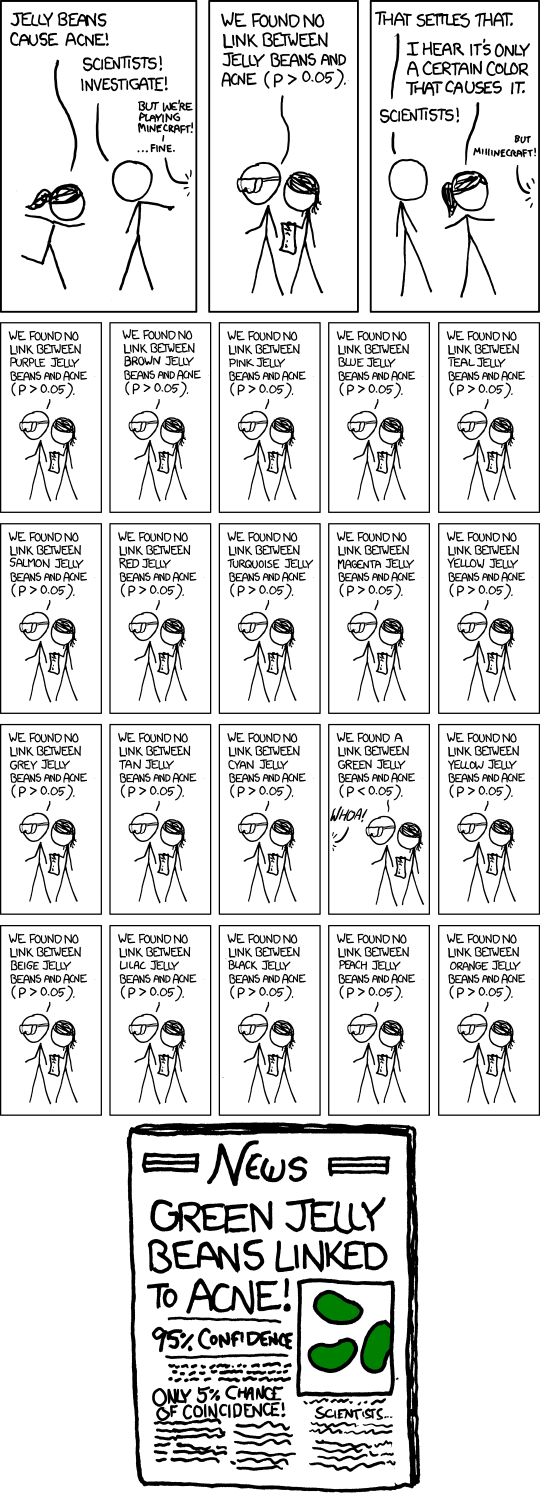
(Collaboration and Kappes 2014; Ioannidis 2005; Elmer 2023): Only 36% of Studies in Psychology had a statistically significant result the second time, only 6% of benchmark cancer results, stays significant a second time. This problem sticks for basically any scientific domain.
What Makes a Study Replicable?
Replication and reproducibility are often used interchangeably but refer to different concepts:
- Reproducibility: Can someone re-run your exact analysis using the same data and code?
- Replicability: Can someone recreate your findings independently using new data?
(Bleier et al. 2025) provides a useful framework combining data and analysis availability:
| Data | |||
| same | different | ||
| Analysis | same | Reproducible | Replicable |
| different | Robust | Generalizable |
Replication crisis in CSS
- In CSS, large datasets reduce standard errors \(\rightarrow\) even tiny effects can appear significant.
- Easy access to massive text or behavioral data enables rapid, often unchecked, experimentation.
Reproducibility in Computational Social Science (CSS) is even less established compared to other scientific disciplines (Bleier et al. 2025).
Barriers to Reproducibility
Technical Barriers:
- Reliance on APIs: Data from social media platforms are volatile.
- Example: (Imprint 2023) found:
- Only 1 in 16 tweets remained available after 24 hours.
- 15% of tweets were missing after one month.
- Example: (Imprint 2023) found:
- Computational environment variability:
- Software versions, and dependencies change quickly.
- Makes it hard to reproduce results exactly unless environments are documented or containerized.
Human Barriers:
- Lack of programming skills and computational literacy.
- Time constraints and incentives that discourage code sharing.
- Reluctance to share messy code or undocumented workflows.
Data Barriers
- CSS data is:
- Often non-representative.
- Ethically ambiguous to share.
- Frequently governed by Terms of Service that prohibit redistribution.
The diversity and fragility of computational setups, combined with unstable and unrepresentative data, make reproducibility a major challenge in CSS.
For the re-analysis of Studies we need (Breuer 2025):
| Item | Replication | (Computational) Reproduction |
|---|---|---|
| Original paper | Required | Required |
| Study materials | Required | Helpful |
| Experimental protocols | Required | Helpful |
| Data (with documentation) | Helpful | Required |
| Code (with documentation) | Helpful | Required |
Proposed Solutions and Best Practices
Improving reproducibility in CSS requires both technical solutions and cultural shifts.
✅ Proactive Approachess
- Use research compendia: Organized folders that bundle paper, code, data, and metadata.
- Apply literate programming: Tools like RMarkdown, Jupyter, and Quarto combine code and explanation.
- Automate workflows and documentation
📦 Containerization
- Use tools like Docker to define computational environments.
- Ensures that the code runs identically across machines, now and in the future.
🗃️ Sharing and Archiving
- Archive data securely and ethically.
- Avoid reliance on unstable APIs and time-sensitive data (e.g., social media).
Reproducibility Tiers
A tiered system classifies how verifiable a study is:
| Tier | Who Can Reproduce? | Conditions |
|---|---|---|
| 0 | No one | Code/data not shared |
| 1 | Author only | Needs internal setup |
| 2 | Trusted third party | Requires effort |
| 3 | Any qualified user | With minimal setup |
Source: (Schoch et al. 2024)
Cultural Shift
In addition to the research inherent biases, most academic journals have a strong preference for publishing positive results, i.e. those with statistical significant findings. Null results are merely published, even though they are rarely published. Estimates suggest, only 10-30% of all studies conducted ever get published.
Scientific publishing is a billion-dollar industry, dominated by major publishers like Elsevier, Springer Nature, and Wiley. Each year, more than 7 million scientific articles are published worldwide, and publication remains the key currency in academic careers.
Traditionally, research undergoes a lengthy peer review process, which ensures quality but slows down dissemination. In contrast, preprints — early versions of research articles — allow for fast and free sharing of results before formal review. While they lack peer review, they increase transparency and accelerate feedback.
At the same time, the academic world is facing a journal pricing crisis: the cost of large journal subscriptions has become unsustainable for many universities. This has sparked a major shift toward Open Access publishing.
Open Access aims to make research freely available to everyone, without paywalls. It’s part of a broader paradigm shift in how science is shared and evaluated.
A cultural change is needed: reward replication, value null results, and support openness (Auspurg and Brüderl 2022)
- Incentivize reproducibility in funding, hiring, and promotion.
- Make reproducibility a recognized quality indicator.
- Journals should adopt strict data/code policies and enforce transparency.
Open Science Practices
Open Science refers to a set of principles and practices that aim to make scientific research more:
- Transparent
- Accessible
- Reproducible
These practices should be implemented from the beginning of the research process(Schoch et al. 2024; Auspurg and Brüderl 2022; Kohrs et al. 2023).
The core components of Open Science are
Open Data
- Share datasets (where ethical and legal) along with metadata.
- Helps others verify, reuse, or extend your research.
Open Methods
- Share code, workflows, and analysis scripts.
- Use version control and literate programming to ensure clarity.
Open Access
- Make your publications freely available.
- Use preprint servers or publish in open-access journals.
Open Science fosters trust in knowledge production by enabling cumulative science, supporting critical engagement, reducing questionable research practices, and leveling the playing field for researchers across institutions.
Tools for Open Science
Open Science is supported by a growing ecosystem of tools that help researchers share, document, and organize their work.
🧮 Code Sharing
Platforms:
- OSF (Open Science Framework): Project management, storage, and sharing.
- GitHub: Version control, collaboration, and transparency.
Authoring Tools:
- Jupyter Notebooks: Ideal for Python-based workflows.
- RMarkdown / Quarto: Combine text and code in dynamic documents.
- Great for creating replicable reports, papers, and slides.
🗃️ Data Sharing
Repositories:
- Qualiservice: For qualitative research data (Germany).
- Harvard Dataverse: General-purpose data repository.
- GESIS: Specialized in social science data.
Best Practices:
- Always include metadata and documentation.
- Consider licensing and ethical constraints before sharing.
📖 Open Access Publishing
Preprint Servers:
- arXiv (quant/social)
- SSRN (social science)
- OSF Preprints
Open Access Journals:
- PLOS ONE
- Sociological Science
- SSOAR
- etc.
Open Science promotes transparency, collaboration, and accessibility — all essential for progress and trust in research. But greater openness also introduces new risks:
- Public Exposure of early results make it easier for orhers o misuse, misinterpret or steal data and ideas.
- When raw data or methods are openly available, they can be taken out of context, reused unethically, or attributed incorrectly.
- Open sharing increases the risk that others could copy text, figures, or concepts without giving proper credit.
- Once something is openly accessible, it’s harder to control how, where, and by whom it is reused — especially in commercial or political contexts.
But: Openness does not mean a lack of responsibility — researchers are still expected to respect intellectual property, data protection, and proper attribution of ideas.
How to: Git
What is Git?
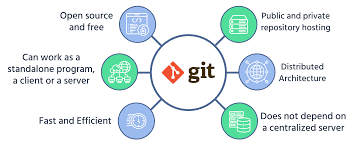
Git is a distributed version control system (DVCS). It was created in 2005 by Linus Torvalds who is also the lead developer of the Linux Kernel. Git is basically a side product of this production so that developers can efficiently manage the workflow and collaborate despite being in different locations.
Key features:
- Free and open source
- Tracks changes in files over time
- Enables collaborative editing
- Works locally, even without internet access
Git has a distributed architecture which means that it isn’t centralized around a single server. In fact, every person contributing to a repository has a full copy of the repository on their own machine; Git can work as a standalone program, as a server and as a client, since it does not depend on a centralized server. It is up to you how to use it: for instance, you may want to host a repository and use Git as a server or access a certain repository from another machine as a client. Well, you can even use it only on a single machine without having a network connection
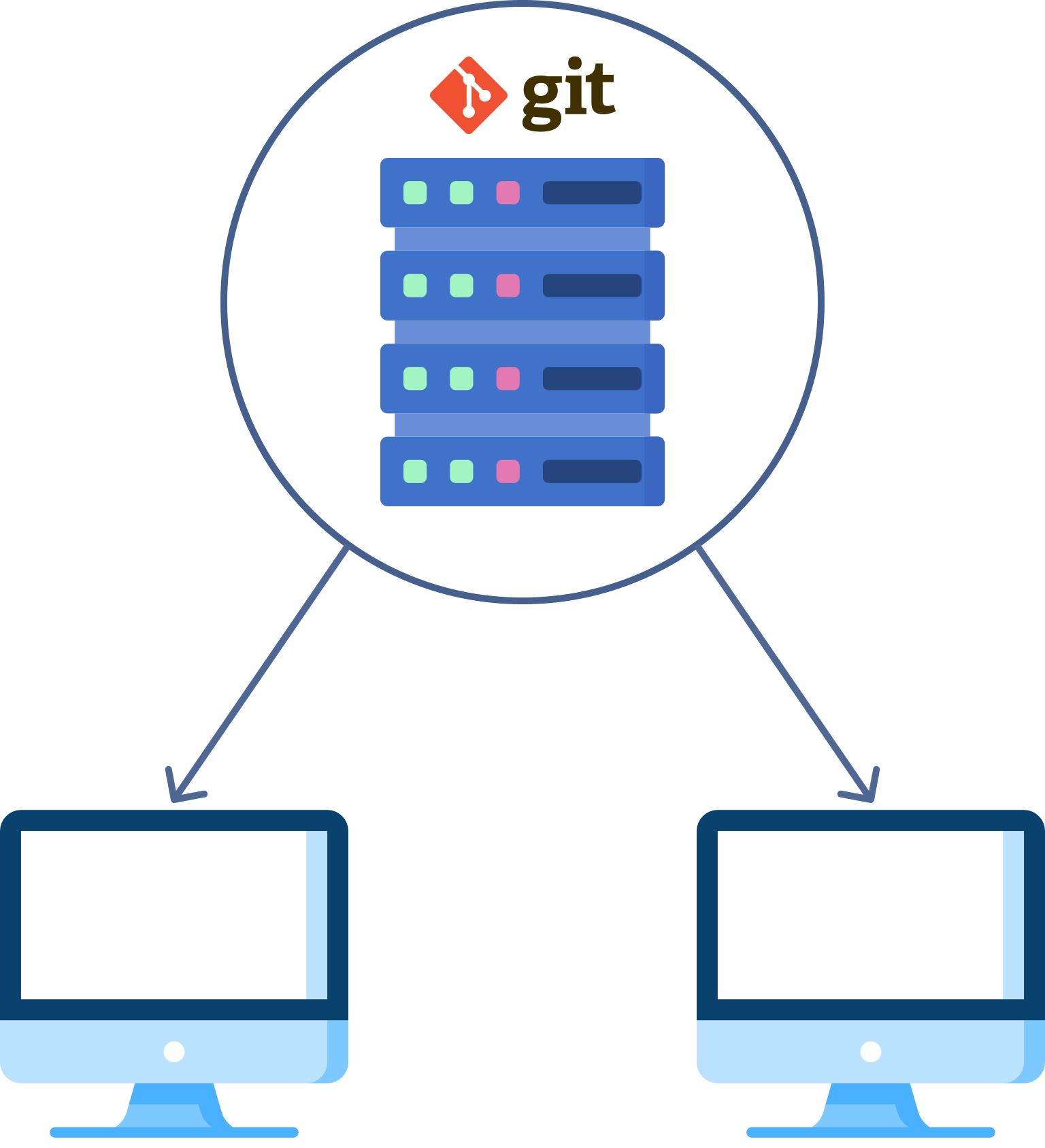
The most popular platforms for Git are GitHub and GitLab.

- Repository (Repo): The central database where Git stores your project’s version history.
- Commit: A snapshot of your repository at a given point in time. It captures changes made to files.
- Branch: A parallel version of your repository. Useful for working on new features or fixing bugs without affecting the main codebase.
- Merge: Combining changes from one branch into another. It integrates changes smoothly and resolves any conflicts.
- Staging area: Prepares changes before committing.
- Pull request: A request to merge changes into a branch. Often used for code review and collaboration.
- Remote: A version of your repository hosted elsewhere (like GitHub, GitLab). It allows collaboration and backup.
- Clone: Copying a repository from a remote to your local machine.
- Push: Sending local commits to a remote repository.
- Fetch: Updating your local repository with changes from a remote without merging them.
- Conflict: When Git cannot automatically merge changes and requires manual resolution.
- Checkout: Switch branches or restore working tree files
You can fin a cheat-sheet for getting started with Git here: https://education.github.com/git-cheat-sheet-education.pdf
.gitignore
A .gitignore-file tells Git which files or folders not to track in your repository. This is important for keeping your project clean and avoiding accidentally sharing things like secrets, passwords, large files, temporary files or build artefacts. Careful: If a file is already tracked by Git, adding it to .gitignore won’t remove it
We can define the objects we want to ifnore by using this syntax:
- Specific files: Just write the filename
- All files of a certain type: Use a wildcard (*) to match patterns
*.log
*.tmp
*.bak- Specific folders: Use relative paths
/logs/debug.log         # Only ignore debug.log in the /logs folder
/temp/*.tmp # Ignore all .tmp files in /temp- Exclude from Negation: Use
!to force include something that would otherwise be ignored
docs/*
!docs/README.md # Only track README.md inside docs/- Everything in a folder except one file
data/*
!data/.gitkeep- Recursive wildcards: Git supports
**for recursive matching
**/*.log # Ignore all .log files in any subdirectoryIn a .gitignore-file we can also use #to write comments
What is GitHub?
- GitHub is a web-based platform that hosts Git repositories.
- Adds collaboration features:
- Shared access
- Pull requests
- Issue tracking
- Wiki and documentation support
GitHub = Git + Collaboration + Community
GitHub Desktop
You don’t need to be a terminal wizard to use GitHub — tools like GitHub Desktop make it more accessible.
- GUI (graphical user interface) for Git
- Great for beginners — no command line needed
- Lets you:
- Track changes
- Commit and sync code
- Create and manage branches
- Download GitHub Desktop from https://desktop.github.com
- Create a GitHub Account
- Open GitHub Desktop and sign in with your GitHub Account
GitHub Education
GitHub Education provides students and teachers with free access to a suite of developer tools, learning resources and premium features including GitHub Copilot.
You can apply for the Student Developer Pack here with your GitHub Account. For the application, you will need to upload a proof of enrollment, and then you are good to go.
References
Auspurg, Katrin, and Josef Brüderl. 2022. “How to Increase Reproducibility and Credibility of Sociological Research.” In Handbook of Sociological Science, edited by Klarita Gërxhani, Nan De Graaf, and Werner Raub, 512–27. Edward Elgar Publishing. https://doi.org/10.4337/9781789909432.00037.
Bleier, Arnim, Danica Radovanović, Maria Zens, Johannes Breuer, Katrin Weller, and Claudia Wagner. 2025. “What Is Computational Reproducibility? (GESIS Guides to Digital Behavioral Data, 2).” GESIS - Leibniz Institute for the Social Sciences. https://doi.org/10.60762/GGDBD25002.1.0.
Breuer, Johannes. 2025. “Reproducibility & Replicability in Computational Social Science Research.” Presentation. figshare. https://doi.org/10.6084/m9.figshare.29086382.v1.
Collaboration, Open Science, and Heather Barry Kappes. 2014. “The Reproducibility Project: A Model of Large-Scale Collaboration for Empirical Research on Reproducibility.” In, edited by Victoria Stodden, Friedrich Leisch, and Roger D. Peng, 299–324. New York, USA: CRC Press.
Elmer, Timon. 2023. “Computational Social Science Is Growing up: Why Puberty Consists of Embracing Measurement Validation, Theory Development, and Open Science Practices.” EPJ Data Science 12 (1): 1–19. https://doi.org/10.1140/epjds/s13688-023-00434-1.
Imprint. 2023. “Jürgen Pfeffer: Studying Human Behavior with Data from Social Media Platforms.” TU Wien Informatics. https://informatics.tuwien.ac.at/news/2422.
Ioannidis, John P. A. 2005. “Why Most Published Research Findings Are False.” PLOS Medicine 2 (8): e124. https://doi.org/10.1371/journal.pmed.0020124.
Kohrs, Friederike E, Susann Auer, Alexandra Bannach-Brown, Susann Fiedler, Tamarinde Laura Haven, Verena Heise, Constance Holman, et al. 2023. “Eleven Strategies for Making Reproducible Research and Open Science Training the Norm at Research Institutions.” eLife 12 (November): e89736. https://doi.org/10.7554/eLife.89736.
“Learn What Is Git? Introduction to Git.” n.d. https://codefinity.com/courses/v2/7533d91f-0a23-44a3-afc7-c84d5072e189/5aa6942a-dab9-4c0a-a3c4-4e21b6f8fd1b/36a2362a-109b-4662-8b57-af2687f0f02c. Accessed June 25, 2025.
Schoch, David, Chung-hong Chan, Claudia Wagner, and Arnim Bleier. 2024. “Computational Reproducibility in Computational Social Science.” EPJ Data Science 13 (1): 1–11. https://doi.org/10.1140/epjds/s13688-024-00514-w.
Copyright
© 2026 Leonie Steinbrinker